



Description
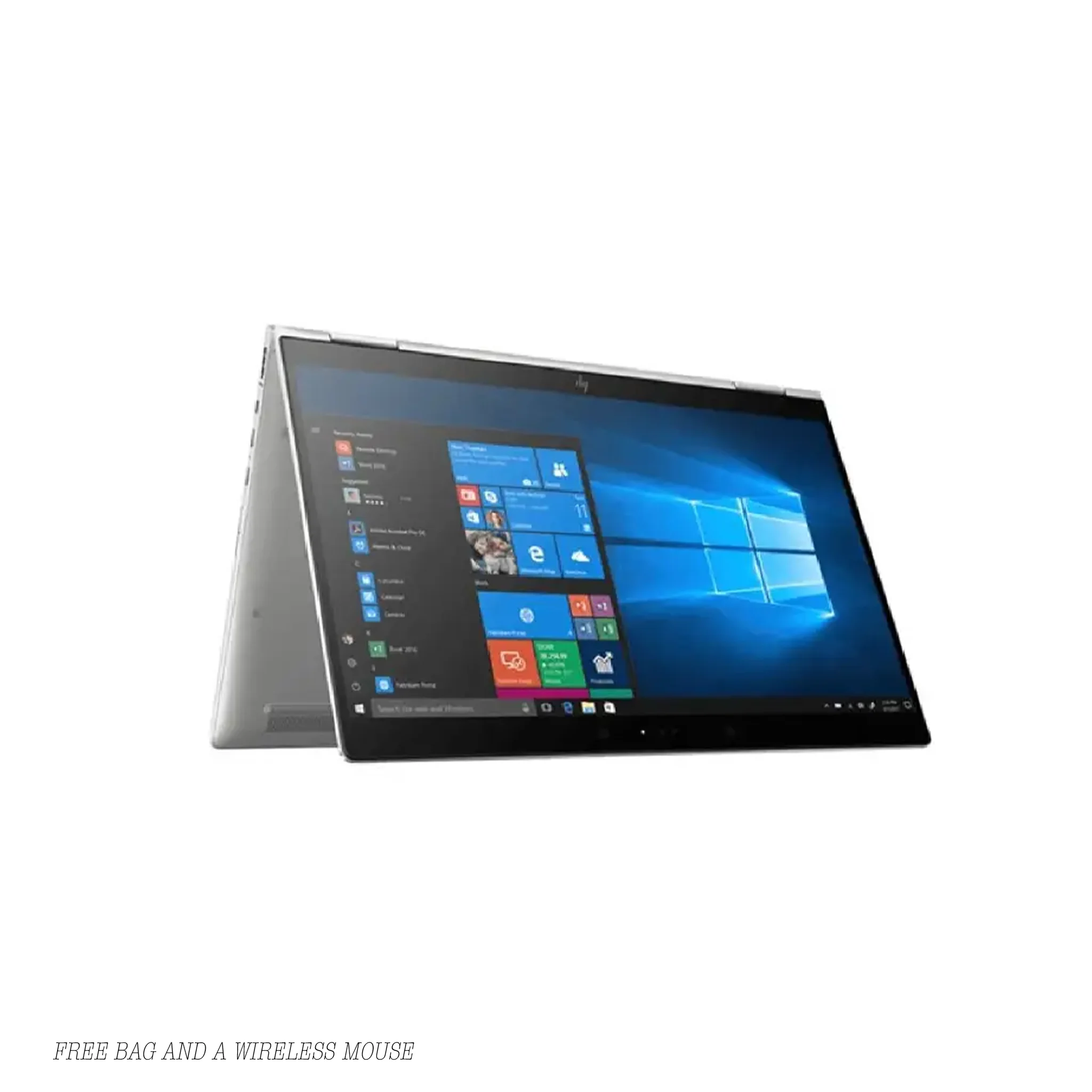
HP x360 1030 G2 i5
Introduction & Positioning
The HP EliteBook x360 1030 G2 belongs to HP’s premium “x360” convertible lineup. It targets professionals who demand portability, flexibility, and security in a sleek form factor. Because it supports 360° rotation, this device adapts between laptop, tablet, tent, and stand modes, making it ideal for both on-the-go productivity and presentations. In this specific configuration—i5, 8 GB, 256 GB SSD, touchscreen—it balances performance and efficiency for business tasks, note-taking, and light creative work.
Over the course of this description, you’ll see how HP integrates durability, security, and adaptability into the design. Then, you’ll find a clear spec sheet to help you evaluate whether this model fits your needs.
Design, Build & Form Factor
From the outset, HP designed the 1030 G2 to be thin and elegant. It features an all-metal CNC aluminum unibody chassis, which gives it both strength and premium feel. According to HP’s official spec sheet, the device passes multiple MIL-STD 810G tests, ensuring it can withstand vibrations, shocks, temperature extremes, and dust.
Because of its convertible hinge mechanism, this EliteBook allows you to switch between laptop mode (for typing), tablet mode (for touch/pen use), tent mode (for presentations), and stand mode (for media viewing). That versatility ensures that, when you move from editing documents to drawing sketches, you don’t need a separate device. Moreover, the hinge is engineered to feel stable yet smooth, so transitions feel natural under your fingers.
Despite packing in premium components, the 1030 G2 remains remarkably portable. Its weight sits around 1.28 kg, and its thickness is about 1.49 cm (0.59 in) in many configurations. You’ll find that it slides easily into bags, briefcases, or carrying sleeves without being bulky.
Performance, Memory & Storage
At its core, this unit runs on the Intel Core i5-7200U (7th Gen, Kaby Lake) processor, which operates at a base frequency of 2.50 GHz and can boost up to 3.10 GHz (Turbo Boost) when needed. Because it has two cores and supports Hyper-Threading, it handles common business tasks—like Excel, Word, multiple browser tabs, email, and video conferencing—with ease. In fact, reviewers in their tests confirmed that the i5 variant delivered smooth performance in everyday workloads.The device comes equipped with 8 GB DDR4 RAM, which provides adequate capacity for multitasking. Although it’s not ideal for heavy virtualization or extremely memory-hungry workloads, it handles most productivity software without major lag.
For storage, a 256 GB SSD (PCIe/NVMe in many models) ensures speed in booting, launching apps, and loading files. Compared to traditional hard drives, this SSD drastically reduces waiting times and keeps the system feeling responsive. Many units in the x360 1030 G2 family ship with this type of storage configuration.
As a result of this hardware pairing, performance in day-to-day use feels snappy. For example, tests with the Full HD (1080p) configuration show that the system responds fluidly in real-world tasks, with minimal stutter or delay even when juggling multiple apps.
Display & Touch / Pen Interaction
One of the key strengths of the x360 1030 G2 is its 13.3″ fullscreen IPS display (Full HD, 1920 × 1080). In many models, HP includes Corning Gorilla Glass to protect against scratches, especially when used as a tablet. The IPS panel offers wide viewing angles, consistent colors, and good contrast, which helps whether you’re collaborating, reading documents, or watching media.
Because it’s a 2-in-1 convertible, the screen supports touch input and stylus/pen interaction (depending on the model). That touch capability lets you annotate presentations or take handwritten notes directly on screen. And since HP’s displays often carry anti-reflective coatings (or optional Sure View privacy screen), they remain usable even under bright ambient lighting.
Moreover, HP engineers typically integrate slim bezels to maximize screen real estate while keeping the overall device compact. Thus, the laptop feels modern, efficient, and suitable for productivity on the go.
Connectivity & Ports
To accommodate modern workflows, HP equips the 1030 G2 with a rich set of I/O and connectivity features. Because in real-world use you’ll often connect to external displays or docks, HP makes this flexible.
Among the supported ports, you often find:
-
Thunderbolt 3 / USB-C port (for high-speed data, video, and power)
-
USB-A 3.1 ports (for standard peripherals)
-
HDMI output (to connect external monitors or projectors)
-
Micro-SD card reader (in some variants)
-
Audio jack (headphone/mic combo)
-
SIM / WWAN slot (in variants supporting mobile broadband)
-
Optional Smart Card reader / NFC / Fingerprint sensor / IR camera
-
Wi-Fi 5 (802.11ac) and Bluetooth 4.2 for wireless connectivity
Because of this connectivity suite, you can plug in your docking stations, monitors, or external SSDs without worrying about adapters. You also benefit from flexible wireless options when you’re away from wired networks.
Security Features & Enterprise Readiness
HP targets business users, so the x360 1030 G2 includes a wide range of security features out of the box. Because enterprises care deeply about data safety and system integrity, HP integrates:
-
HP Sure Start (self-healing BIOS) to prevent firmware attacks
-
Embedded TPM 2.0 (Trusted Platform Module) for hardware-based encryption
-
Optional fingerprint reader and IR-enabled camera / Windows Hello login
-
Pre-boot authentication and drive locking features
-
HP BIOSphere with custom BIOS configurations and self-repair
-
HP Control Zone (proximity sensor) in some models to automatically lock when you walk away
-
Self-encrypting drives (SED) and support for TCG Opal encryption in certain SSD models
Together, these layers help protect your system from malware, unauthorized access, and firmware-level attacks, making the device suitable for corporate and regulated environments.
Battery, Efficiency & Mobility
Because portability matters, HP engineered the x360 1030 G2 with energy efficiency in mind. The laptop often ships with a 57 Wh, 3-cell battery, which HP claims can sustain up to 16 hours and 30 minutes in ideal usage conditions (light workloads, minimal screen brightness). In real-world mixed use (office apps, Wi-Fi, moderate brightness), you can expect a solid workday or more before needing to recharge.
Furthermore, HP supports fast charging, so a short break can top up a significant battery percentage quickly. Because the device is light and compact, carrying it between meetings or workspaces doesn’t impose a heavy burden.
Also, thermal design and power management are tuned to keep heat and noise under control. The laptop remains quiet during everyday tasks, and even under load it keeps fan noise manageable.
Use Cases, Strengths & Trade-offs
This model of the x360 1030 G2 (i5 / 8 GB / 256 GB) shines in settings where you need a convertible, portable, business-class device. Because it’s flexible and secure, it’s well suited for:
-
Professionals who travel and present often
-
Students or executives who want pen / touch input in meetings
-
Corporate environments needing manageability, remote control, and security
-
Productivity tasks, document editing, collaboration, email, light data processing
On the other hand, if your workloads include heavy video editing, large virtual machines, or demanding 3D rendering, you may find the 8 GB RAM or dual-core i5 falling short under sustained pressure. In those scenarios, a variant with 16 GB or a higher-tier CPU offers better headroom.
Still, because the device supports certain upgrades (in some configurations), you may be able to expand RAM or swap storage, depending on the specific model.
Technical Specifications
-
Model: HP EliteBook x360 1030 G2
-
Processor: Intel Core i5-7200U (2.50 GHz base, up to 3.10 GHz Turbo)
-
Memory: 8 GB DDR4 (often soldered or with limited upgrade options)
-
Storage: 256 GB NVMe / PCIe SSD (M.2)
-
Display: 13.3″ Full HD (1920 × 1080) IPS touch with Gorilla Glass (varies by sub-model)
-
Graphics: Integrated Intel HD Graphics 620
-
Wireless: Wi-Fi 5 (802.11ac), Bluetooth 4.2
-
Ports & I/O:
• USB-C / Thunderbolt 3
• USB-A 3.1 (x2)
• HDMI output
• Audio jack (headphone/mic combo)
• Micro-SD / card reader (in some models)
• SIM / WWAN slot (optional in some SKUs)
• Smart card / NFC / fingerprint / IR camera (depending on variant) -
Battery: 57 Wh, 3-cell Li-ion
-
Dimensions: ~317 mm × 218 mm × 14.9 mm
-
Weight: ~1.28 kg
-
Security Features: HP Sure Start, TPM 2.0, BIOSphere, drive encryption, fingerprint / IR (optional)
-
Operating System: Windows 10 Pro (or Windows 10 Business)
-
Warranty / Support: Varies by seller; many business models offer 1–3 year support



Reviews
There are no reviews yet.